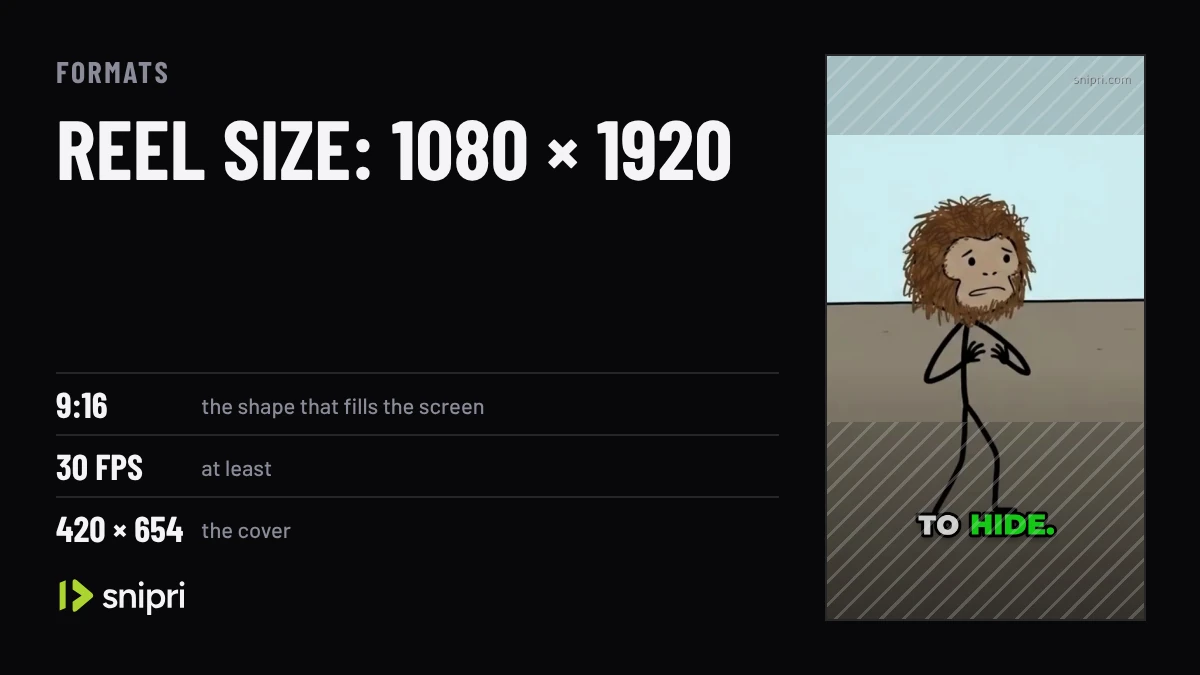
Short answer. Export reels at 9:16, 1080 × 1920 pixels. Instagram accepts any shape from 1.91:1 to 9:16, with a minimum of 30 frames per second and 720 pixels, and recommends a 420 × 654 cover. Keep words and faces away from the bottom of the frame, where the app lays its caption and buttons over the video.
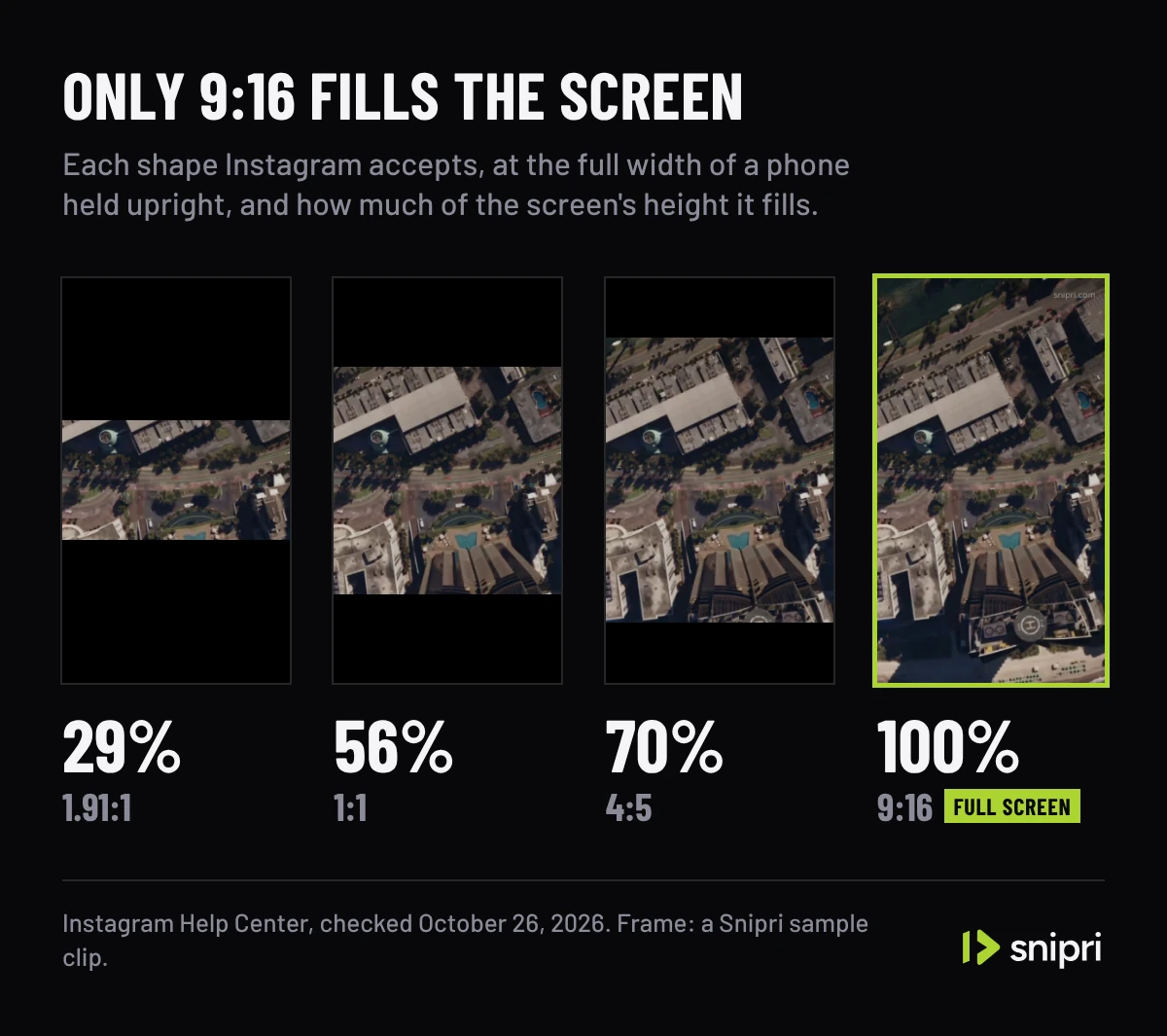
- 9:16 is the full-screen shape; Instagram accepts shapes from 1.91:1 (wide) to 9:16 (tall).
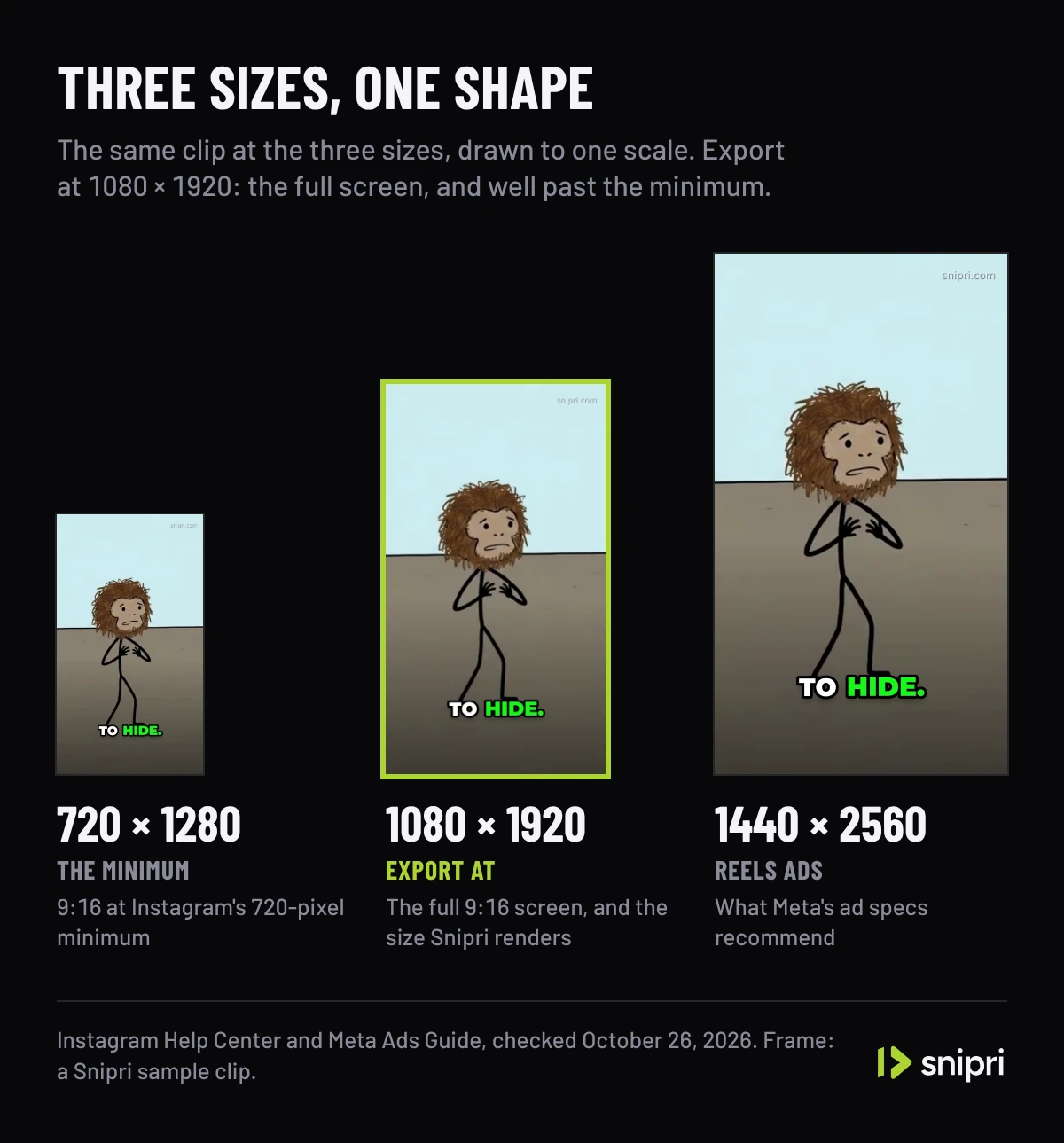
- The minimums are 30 frames per second and 720 pixels, and 1080 × 1920 clears both.
- The cover is 420 × 654 pixels (1:1.55), and Instagram says it cannot be changed after upload.
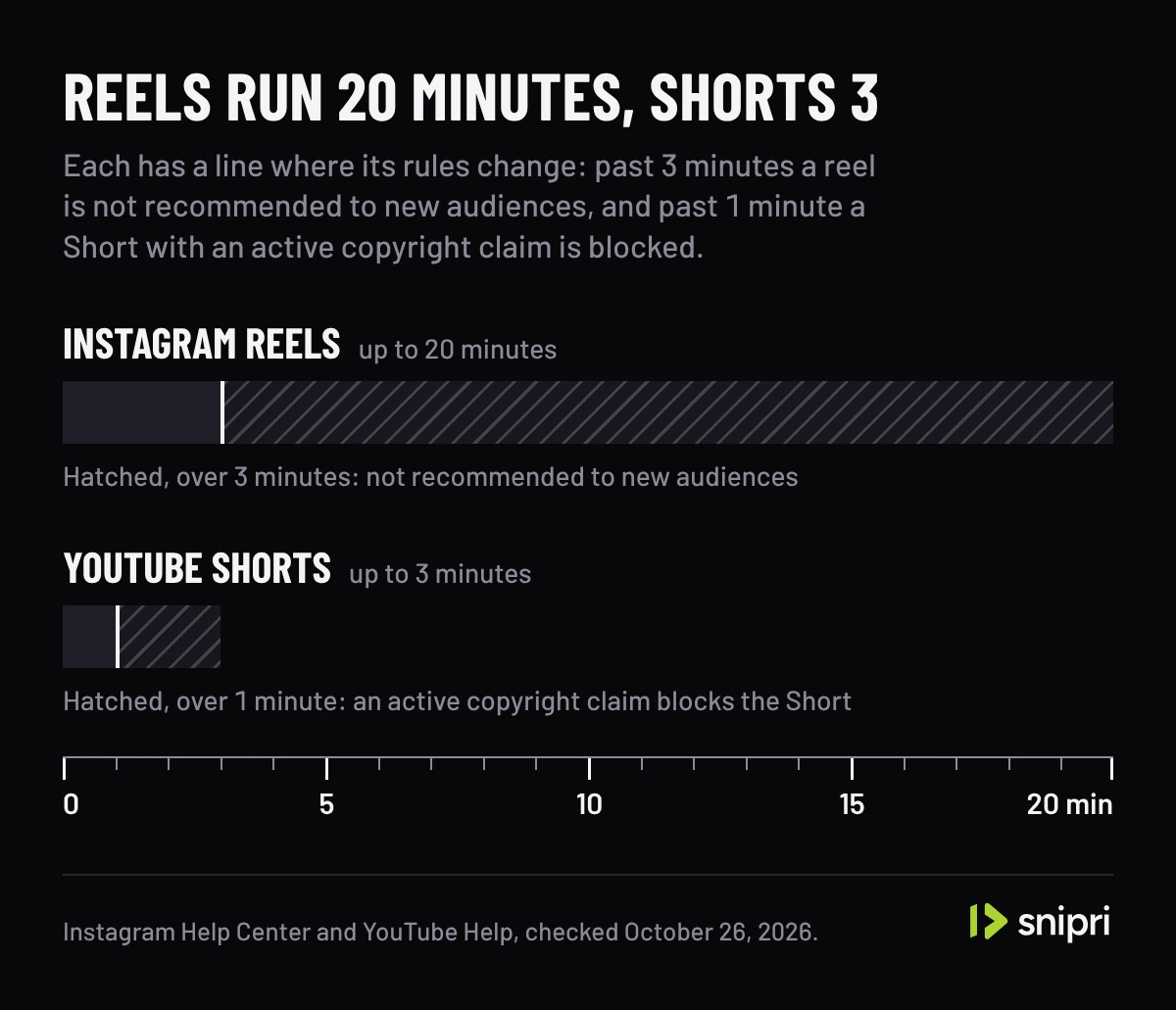
- A reel can run 20 minutes, but reels over 3 minutes are not recommended to new audiences.
- Instagram publishes no safe zone for ordinary reels. Meta's guidance for Reels ads keeps the top 14%, the bottom 35% and 6% of each side free of text.
A reel has one shape that fills the screen and a range of shapes Instagram will take anyway. The numbers below are Instagram's own, from its help pages, and the safe zone figures are Meta's, from its guidance for Reels ads, because Instagram publishes none for ordinary reels.
The size to export: 1080 × 1920
| Setting | Value | Where it comes from |
|---|---|---|
| Aspect ratio | 9:16 to fill the screen; anything from 1.91:1 to 9:16 is accepted | Instagram Help Center |
| Resolution | 720 pixels at least; 1080 × 1920 for a full-screen reel | Instagram Help Center; 1080 × 1920 is 9:16 at 1080 pixels wide |
| Frame rate | 30 frames per second at least | Instagram Help Center |
| Cover | 420 × 654 pixels (1:1.55) | Instagram Help Center |
| Length | Up to 20 minutes; over 3 minutes, not recommended to new audiences | Instagram Help Center |
| Reels ads | 1440 × 2560 recommended | Meta Ads Guide |
1080 × 1920 is the working size because it is the full 9:16 frame at a resolution well past Instagram's 720-pixel minimum. It is also the size Snipri renders every vertical clip at.
Every shape Instagram accepts
Instagram takes reels from 1.91:1, wider than a 16:9 video, to 9:16. Only 9:16 fills a phone held upright. Drawn at the full width of a 9:16 screen, a 1.91:1 video covers 29% of the screen's height, a square 56% and a 4:5 video 70%.
So a wide recording is worth reframing rather than posting as it is. Cropping a 16:9 frame to 9:16 keeps about a third of its width, and the third that matters moves whenever the speaker does. Snipri's auto reframe tracks the speaker's face to place that crop, and can stack two or three people when they share the shot; long video to Shorts shows what a full job returns.
Safe zones: where words stay readable
Instagram lays the account name, the reel's caption, the audio line and the like, comment and share buttons over the video. Instagram itself publishes no safe zone for ordinary reels. The nearest official figure is Meta's guidance for Reels ads: leave at least 14% of the top, 35% of the bottom and 6% of each side free of text, logos and other important elements. Meta adds two notes. A Reels ad with a disclaimer should keep the bottom 40% free, and on screens taller than 9:16 an ad may be zoomed to fill the screen, which can crop what sits outside the safe zone.
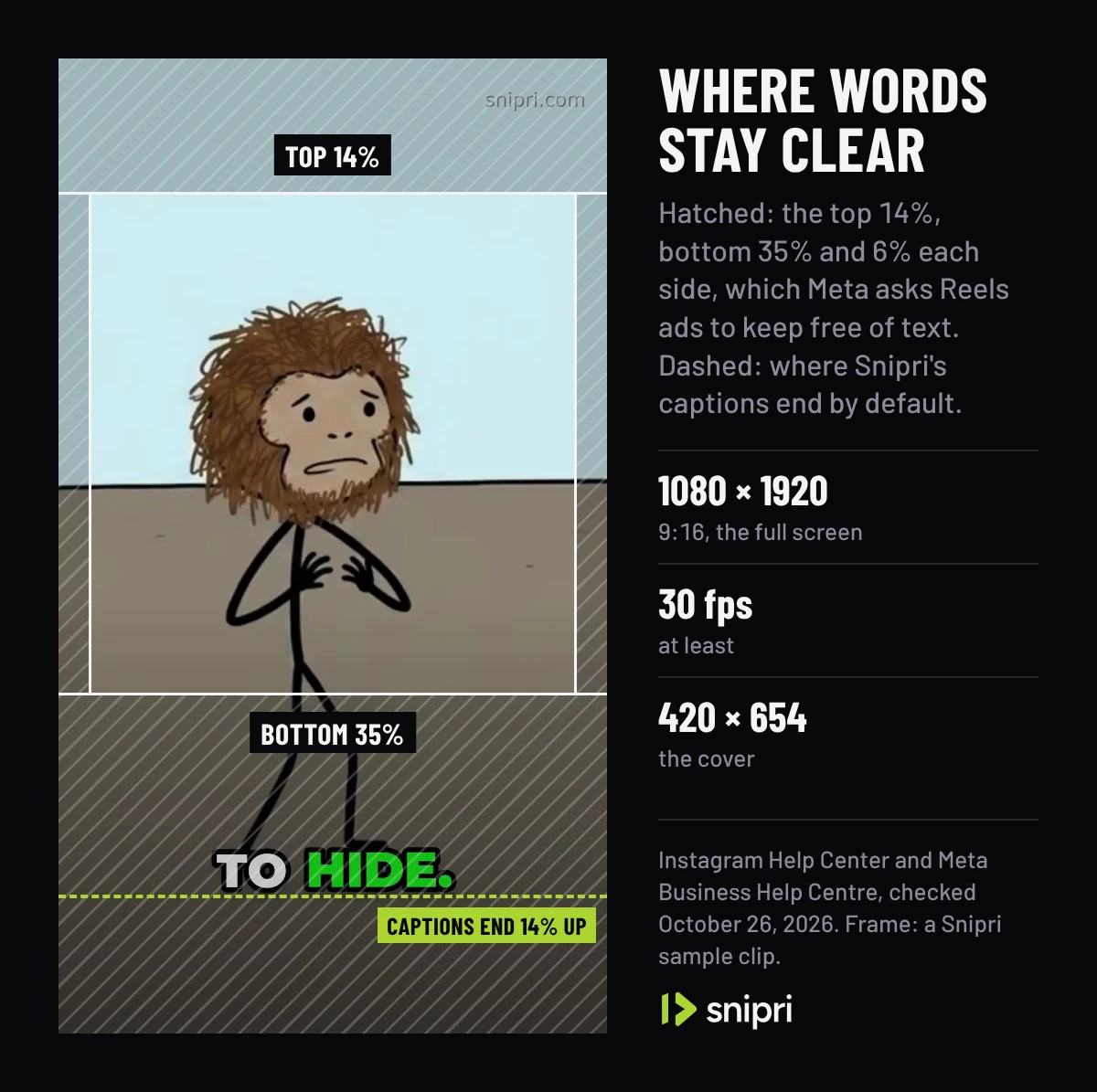
Snipri burns captions with the bottom of the caption block 14% above the bottom of the frame, under the speaker's face, which puts them inside the bottom 35% Meta keeps clear for ads. For a reel you will run as an ad, or one with a long caption under it, move the captions up: the editor offers top, middle and bottom positions, and you can drag the captions to another spot in the frame. Then check the reel in Instagram's preview before you share it. The caption review workflow covers the rest of that check.
A Snipri sample clip on a 9:16 phone screen. First, each shape Instagram accepts at the screen's full width, from 1.91:1 at 29% of the height to 9:16 at all of it; then Meta's Reels ads safe zone over the clip with Snipri's captions where they burn by default, inside the bottom 35%; then the captions moved to the middle, clear of every zone. The zones and the bands outside each shape are drawn.
How long a reel can be
Instagram lets you make a reel of up to 20 minutes, from one clip or several. Its help page adds that reels over 3 minutes will not be recommended to new audiences, so a reel meant to reach people who do not follow you yet should stay under that. How long Instagram Reels can be covers the limits in full, with the cap for Reels ads and how to bring a reel under 3 minutes. YouTube's numbers are different: a Short stops at 3 minutes, and a copyright claim blocks one over a minute. The comparison is in how long YouTube Shorts can be.
Upload at the highest quality
Instagram has a setting that always uploads reels at the highest quality. Its help page describes where to find it on a phone:
- Tap Profile or your profile picture in the bottom right.
- Tap Menu in the top right.
- Below Your app and media, tap Media quality.
- Turn on Upload at highest quality.
Instagram notes that a reel at a higher quality may take longer to upload.
The cover
The cover is the image that stands for a reel before it plays. The recommended size is 420 × 654 pixels, a 1:1.55 ratio, and you can pick a frame from the reel or upload an image. Instagram says the cover cannot be edited after the reel is uploaded, so set it before you share.
More guides on lengths and sizes are in short video formats and specs.
Common questions
What size is an Instagram Reel in pixels?
1080 × 1920 for a full-screen 9:16 reel. Instagram's own minimum is 720 pixels, and Meta's ad specs recommend 1440 × 2560 for Reels ads.
Can I post a horizontal video as a reel?
Yes. Instagram accepts reels as wide as 1.91:1, but a wide video fills less than a third of the height of a phone held upright, so the rest of the screen goes unused.
What is the Instagram Reel cover size?
420 × 654 pixels, a 1:1.55 ratio. Instagram's help page says the cover cannot be edited once the reel is uploaded, so choose it before you share.
How long can an Instagram Reel be?
Up to 20 minutes, made from one clip or several. Instagram notes that reels over 3 minutes will not be recommended to new audiences.
Where should captions go on a reel?
Above the bottom of the frame, where the app shows the account name, the caption and the buttons. Instagram gives no figure for ordinary reels; Meta asks Reels ads to keep the bottom 35% free of text, and 40% when the ad carries a disclaimer.
Sources
- Instagram Help Center: Reel size and aspect ratios on Instagram, checked October 26, 2026.
- Instagram Help Center: Record a reel on Instagram, checked October 26, 2026.
- Meta Ads Guide: Video ad specs for Instagram Reels, checked October 26, 2026.
- Meta Business Help Centre: About text overlays and the Safe Zone for ads in Stories and Reels, checked October 26, 2026.
- YouTube Help: Understand three-minute YouTube Shorts, checked October 26, 2026.
Cihan DüzgörenBuilds and runs Snipri, and wrote this guide