
Autoreframe
Auto reframe: convert horizontal video to vertical
A landscape recording cropped down the middle loses whoever sits off centre. Snipri reframes each shot on its own: it finds the faces, picks a layout for the shot and renders the clip at 1080×1920.
Your first 2 videos are free, up to 1 hour each. No credit card required.
What is auto reframe?
Auto reframe crops a horizontal video into a vertical one by following what matters in each shot. Snipri looks for faces again after every camera cut, keeps the speaker in a 9:16 frame, gives two or three people a pane each, splits a seated group of four or more into two or three panes, and keeps a shot whole over a blurred copy of itself when no face is large enough to follow.
Four shots from two recordings, as Snipri reframed them: two people get a pane each, a group of four shares three panes, one speaker is followed, and a shot whose faces are all too small stays whole. On the left, the lime frames are what the clip shows and each face Snipri tracks carries its share of the frame's height; on the right plays the clip it rendered.
Recordings: “The Doctor Apocalypse & Baron von Evilstein Show - Episode 6: Part 2” by Doctor Apocalypse & Baron von Evilstein and “ВИЛКА 2 0 Лекция 1 Александр Спектр” by We are Praxis, from the YouTube UGC dataset, under CC BY 4.0, cut, without sound and with Snipri’s framing drawn over them. The clips are Snipri’s renders, scaled down and not retouched.
1080×1920
Every clip from a job, vertical
Per shot
Faces found again after every camera cut
2 or 3
People in one frame, a pane each
12%
Smallest face it crops to, as a share of the frame's height
2.5×
Most it enlarges the source picture
7 layouts
To pick from in the editor, scene by scene
How auto reframe works
It finds the faces in every shot
A camera cut starts a new shot, and the search for faces starts again. A face smaller than 12% of the frame's height, such as a webcam inset, stays in the picture rather than being cropped to.
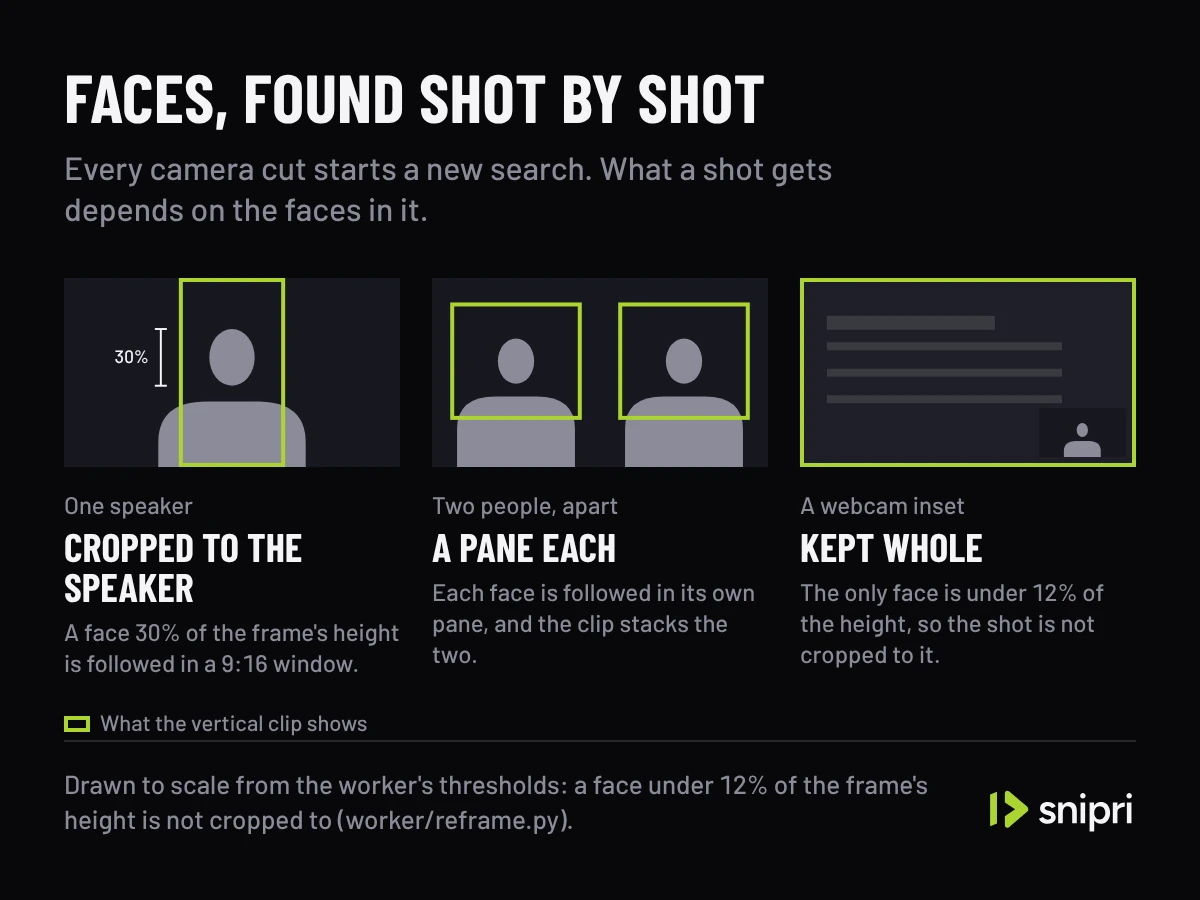
Drawn to scale from the worker's own thresholds. It picks a layout for each shot
One speaker is framed with room for shoulders and hands. Two people get a 1080×960 pane each and three get 1080×640. A seated group of four or more is split at the gaps between people into two or three panes, so no head is cut, and a shot with no face to follow is kept whole.
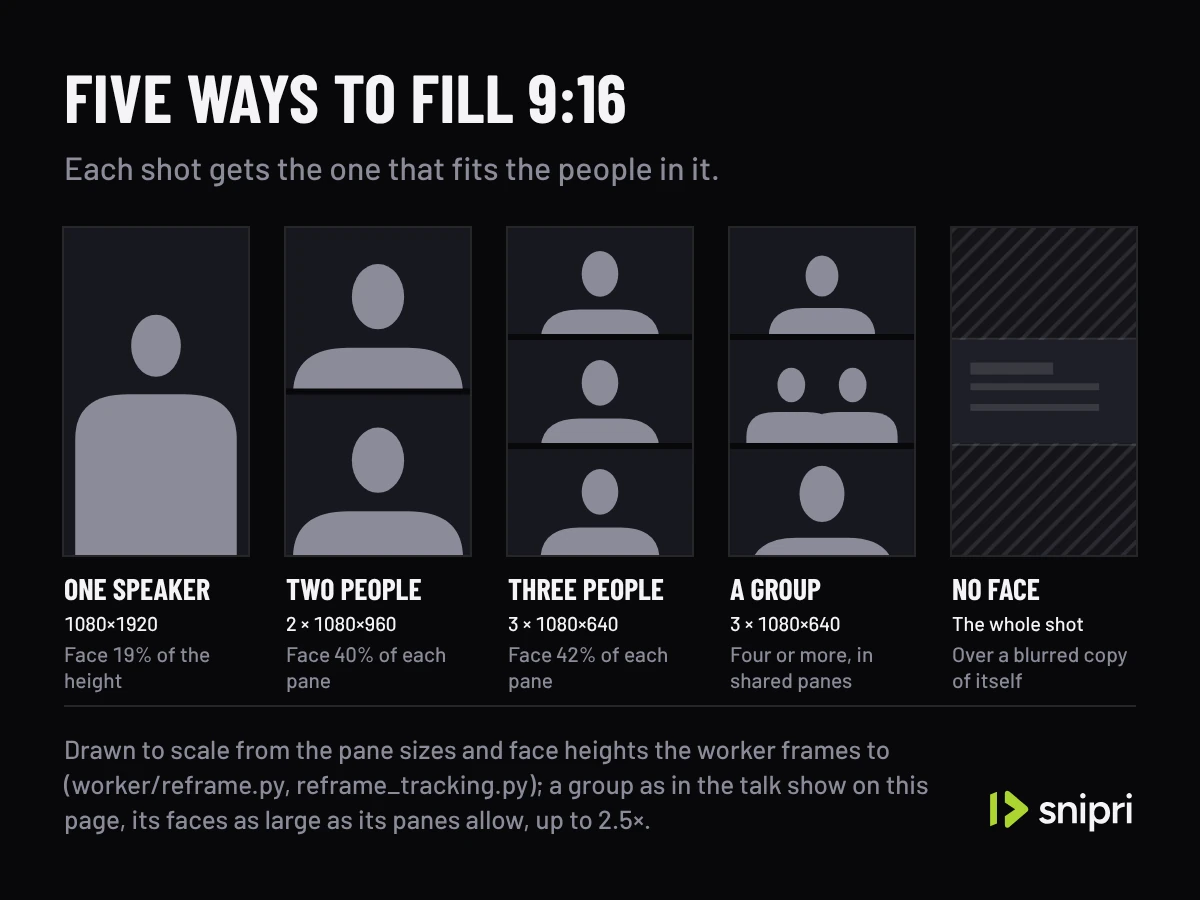
Five of the layouts a job chooses from, drawn to scale. The sixth, Screen + speaker, is for a confirmed webcam inset. You can change any of it
In the editor, give a scene another of the 7 layouts, move or zoom each view, or re-render the clip square or landscape.
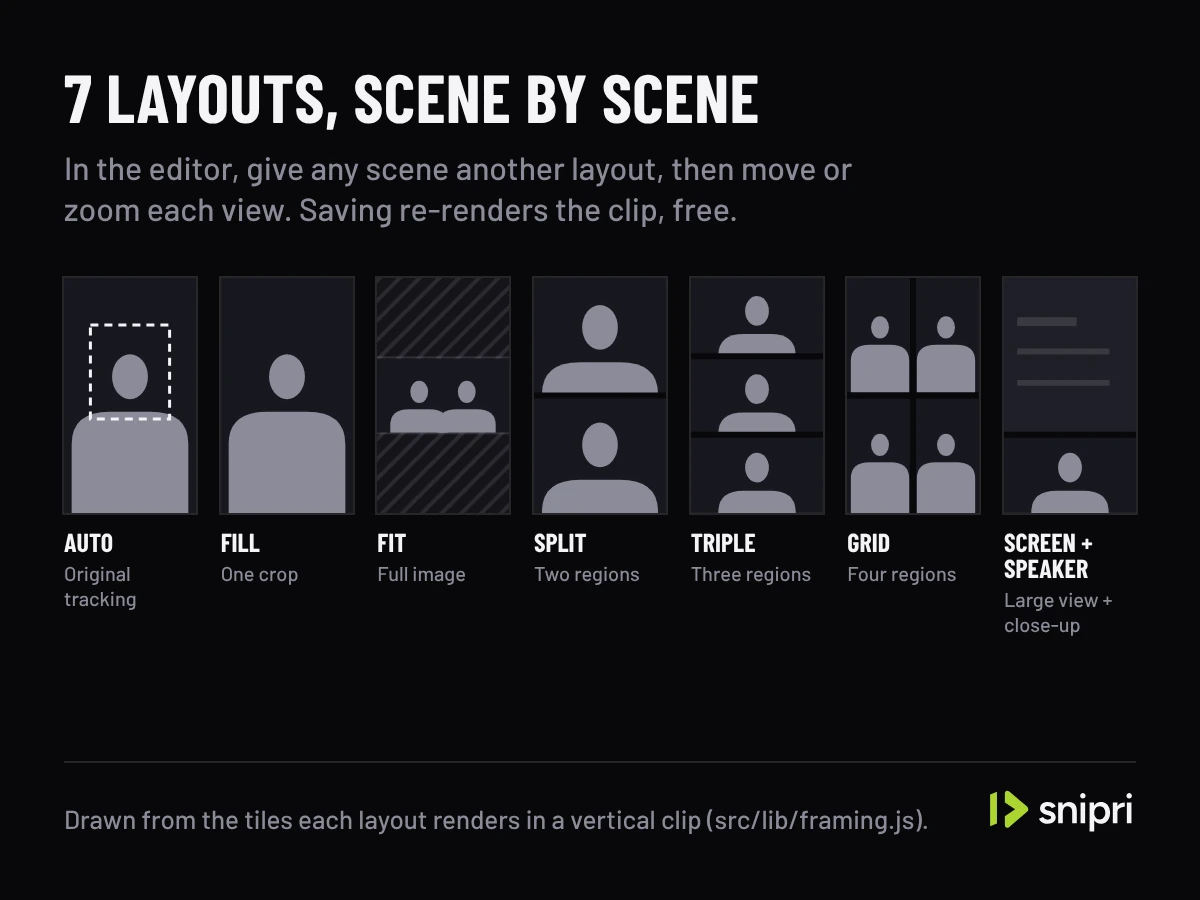
The editor's layouts, drawn from the proportions it renders.
Wide to vertical
The crop follows the speaker.
Snipri's own 9:16 render of a wide stage shot, the frame staying on the speaker as they move.
On podcasts, webinars and Shorts
Podcast clip maker
Two hosts in one wide shot get a pane each, and on a longer turn the clip can show the host who is talking.
Webinar clip maker
With a webcam inset confirmed, the slides go on top and your close-up below, so nobody appears twice.
YouTube Shorts maker
Landscape in, 9:16 out: the crop follows the person on camera from shot to shot.
What auto reframe does not do
It does not crop to small faces.
A webcam inset or a speaker far from the camera keeps the whole shot, or gets the Screen + speaker layout when the kind of video is Webinar, Product reviews, How-to, Sports commentary or Gaming.
It does not sharpen a link.
Video pages are fetched at up to 720p, so upload the original file for the cleanest crop.
It does not make square or landscape clips from a job.
Every clip starts at 1080×1920, and the editor re-renders one at 1:1 or 16:9.
It does not read what is on screen.
It follows faces, and keeps the whole shot rather than guess at a crop.
Frequently asked questions
Can I turn a horizontal video vertical without cutting anyone out?
Yes. Two people who sit apart each get a pane of their own, and three get a third of the frame each. A seated group of four or more is split at the gaps between people into two or three panes, each holding every head of its group whole and no part of anyone else's. When no split keeps everyone whole, or people sit too close together to split safely, the shot stays whole over a blurred copy of itself, so nobody is cut in half.
Does auto reframe work on screen recordings?
It keeps the screen whole. When the kind of video is Webinar, Product reviews, How-to, Sports commentary or Gaming and Snipri confirms a webcam inset, the clip shows the screen on top and the close-up below. Without a face, the whole frame sits over a blurred copy of itself.
Can I fix a crop I do not like?
Yes. In the editor you can give a scene another of the 7 layouts, move or zoom each view, and split a scene so each part gets a layout of its own. Saving re-renders the clip, and edits are free.
Why does a clip from a link look softer than one from an upload?
A video page is fetched at up to 720p, and a vertical crop keeps about a third of a wide frame's width, so the crop has fewer pixels to fill 1080×1920 with. Uploads keep the resolution they were recorded at.
Is Snipri free?
You start with 2 free videos of up to 1 hour each, once, with a watermark and no credit card. Paid plans start at $29.90/month for 10 videos a month, each up to 2 hours, without a watermark. A video counts once for each hour of it, rounded up, and only when it gives you at least one clip.
More Snipri features
AI clip selection
How Snipri's AI picks clips from a podcast or long video: it scores every moment, keeps only clips that stand on their own and shows why each one was chosen.
Animated captions
Animated AI captions for vertical clips: every word timed to the moment it is said, in a style you pick, in 25 languages, and restyled any time after export.
Brand kit
Save your logo, handle, font and caption look once in Snipri's brand kit, and every new clip is born wearing them. Change the kit any time, on every plan, free.
Clip editor
Snipri's clip editor: trim, split or extend a clip, rewrite its hook title, restyle the captions, add text, images, B-roll and music, then re-render it free.
Guides and comparisons
Try it on your own recording.
Upload one recording and see auto reframe on your own video. Your first 2 videos are free, up to 1 hour each, no credit card needed.