Short answer. Open captions are part of the picture: burned into the video, always on and the same in every app. Closed captions are a separate text track that viewers switch on or off. For a short clip posted to Shorts, Reels or TikTok, open captions are the dependable choice; for a long video on a player that takes caption files, add a closed track.
- W3C defines open captions as always displayed and impossible to turn off, and closed captions as ones viewers can hide or show.
- Captions carry the speech, and the sounds needed to follow it, in the same language; subtitles translate it.
- Burned-in text looks the same everywhere and travels with the file, but fixing a typo means a new export.
- A closed track can be corrected without touching the video, and YouTube can make one automatically, in the video's default language only.
- A caption track switched on over burned-in text puts the words on screen twice, so check the preview with captions on.
Captions come in two kinds, and the difference is where the words live. Open captions are drawn into the video itself. Closed captions travel beside it as text that a player draws on top when the viewer asks for it. Which one a clip needs depends on where it will be watched and who decides whether words appear.
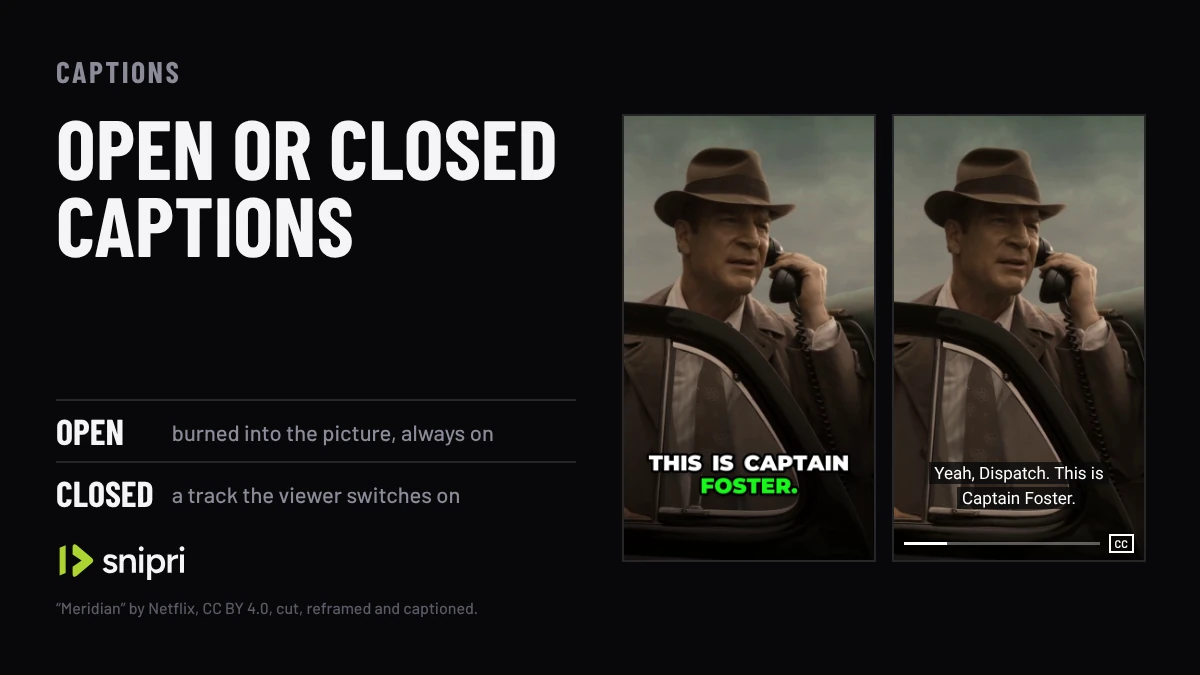
The difference in one picture
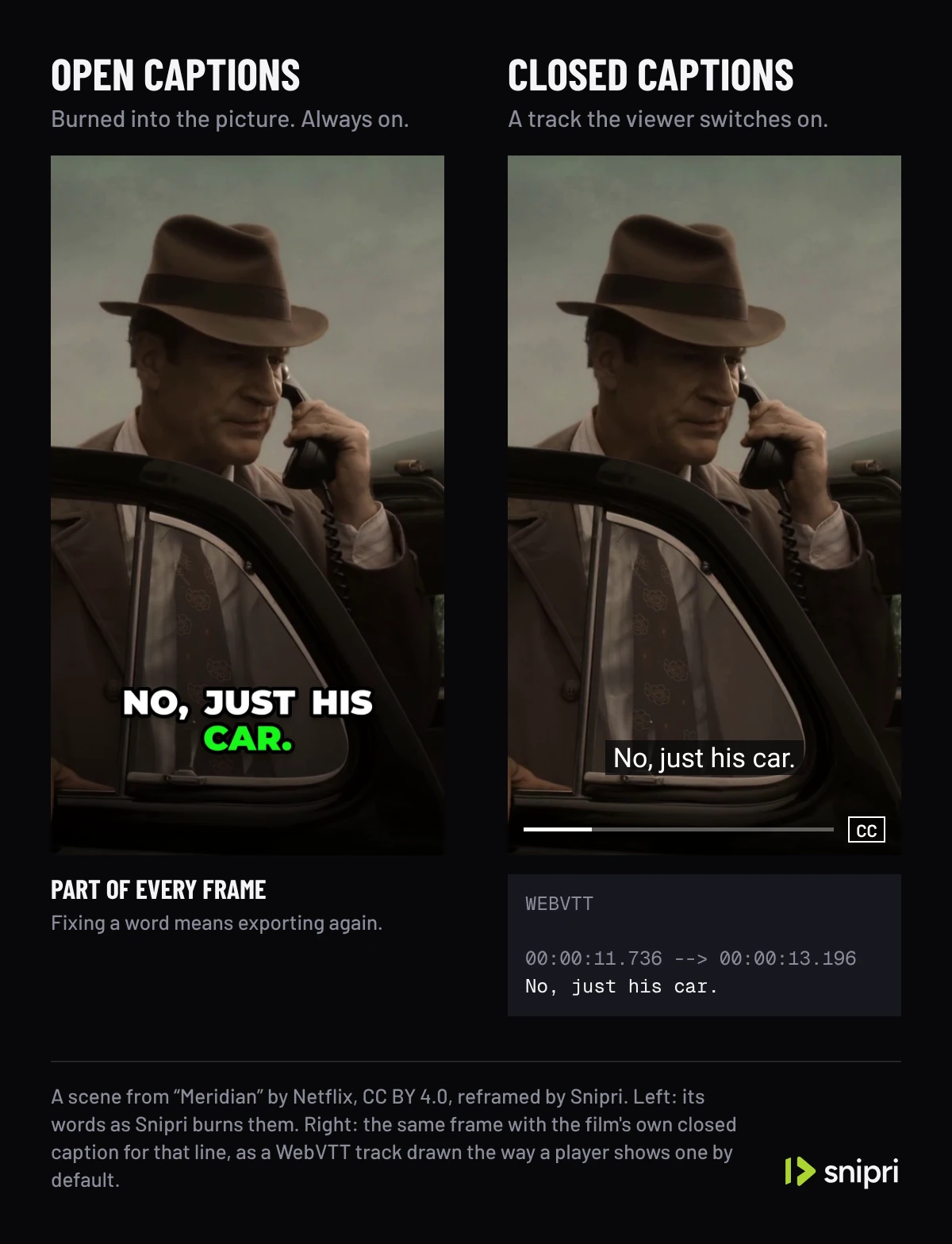
The W3C's accessibility guidance puts it in two lines. Most captions are closed captions, which people watching can hide or show. Open captions are always displayed and cannot be turned off. It adds that most web videos show closed captions in the player's default style, usually white characters in a black box, and that support across browsers and players is inconsistent.
| What differs | Open captions | Closed captions |
|---|---|---|
| Where the words live | In the video's pixels | In a separate track or file, such as WebVTT |
| Can a viewer turn them off | No | Yes |
| Who sets the look | You, once, for every viewer | The player, and in some players the viewer |
| Fixing a mistake | Export the video again | Edit the track |
| Where a platform takes no caption file | Still shown | Not available |
| More than one language | One per export | One track per language |
Both kinds can carry the same words. What differs is who controls them once the video is exported: with open captions you do, and with closed captions the player and the viewer do.
A radio call from the film Meridian twice: on the left with captions burned in by Snipri's renderer, on the right with the film's own caption track. Switched off, the track goes and the burned words stay; with the track over burned words, every line is on screen twice. The players and the track are drawn the way a player shows a track by default.
Film: “Meridian” by Netflix, from Netflix Open Content, under CC BY 4.0, cut, reframed and captioned, without sound.
Captions, subtitles and the other names
W3C defines captions as a text version of the speech and the non-speech audio needed to understand a video, in the same language as the speech. Subtitles are the speech translated into another language. Captions are needed for accessibility, and subtitles in another language are not, by themselves, an accessibility accommodation.
The film in the video above has captions of that kind: besides the words, its track names sounds and voices, such as [thunderclap] and [female dispatcher].
The other names map onto those two kinds. Burned-in and hardcoded captions are open captions. CC, the button on a player, stands for closed captions.
When open captions are the better choice
Open captions suit a clip that will be watched in a feed, reposted or downloaded:
- The words travel with the file. A clip saved, reposted or sent in a message keeps its captions, because they are part of the picture.
- They need nothing from the viewer. A closed track has to be found and switched on; open captions are on screen from the first frame.
- The look is yours. Fonts, colours, position and a highlight on the word being spoken stay exactly as you set them in every app.
- They work where no caption file can go. Wherever a platform takes only the video, open captions are the only captions it will show.
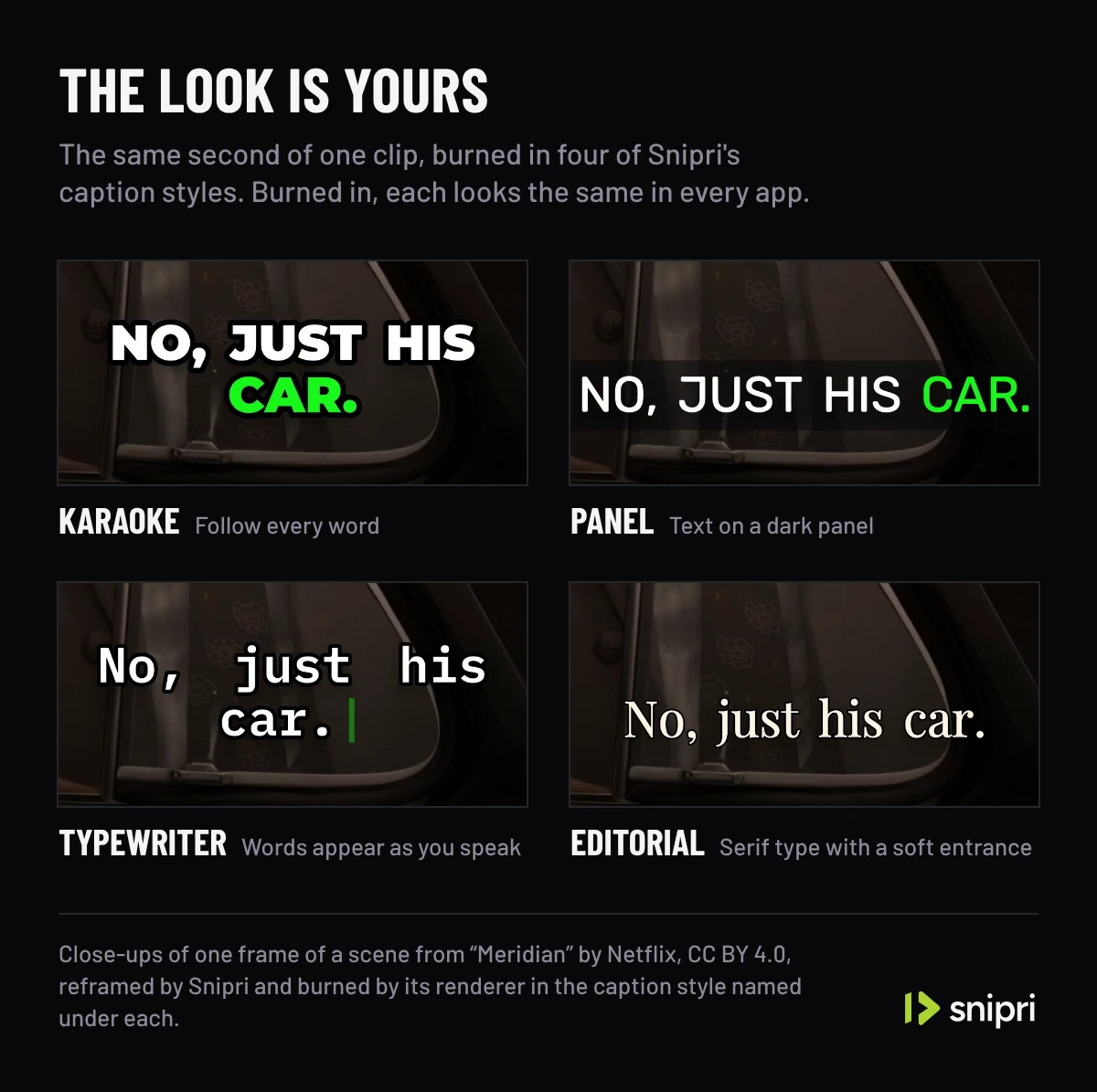
The cost is that the words cannot be changed after export. A misheard name or a wrong number means fixing the text and exporting again, which is why the caption review workflow checks every word against the audio before the final export.
When closed captions are the better choice
Closed captions suit a long video on a player that accepts caption files, such as YouTube:
- Viewers decide. Someone who does not need captions can hide them, and some players let viewers set how and where captions are displayed.
- Corrections are cheap. A typo is fixed in the track; the video is not touched.
- Languages stack. Each language is its own track, so one upload can serve several.
On YouTube you can upload a caption file with timing, upload a transcript without timing and let YouTube sync it, or start from the automatic captions its speech recognition creates. YouTube does not recommend syncing a transcript for videos over an hour long or with poor audio, and automatic captions come in the video's default language only, so review them before you rely on them.
Doing both without showing the words twice
A clip with burned-in captions and a closed track shows the same words twice once a viewer switches captions on. Platforms that make automatic captions can add a track you did not upload, so check the published preview with captions switched on.
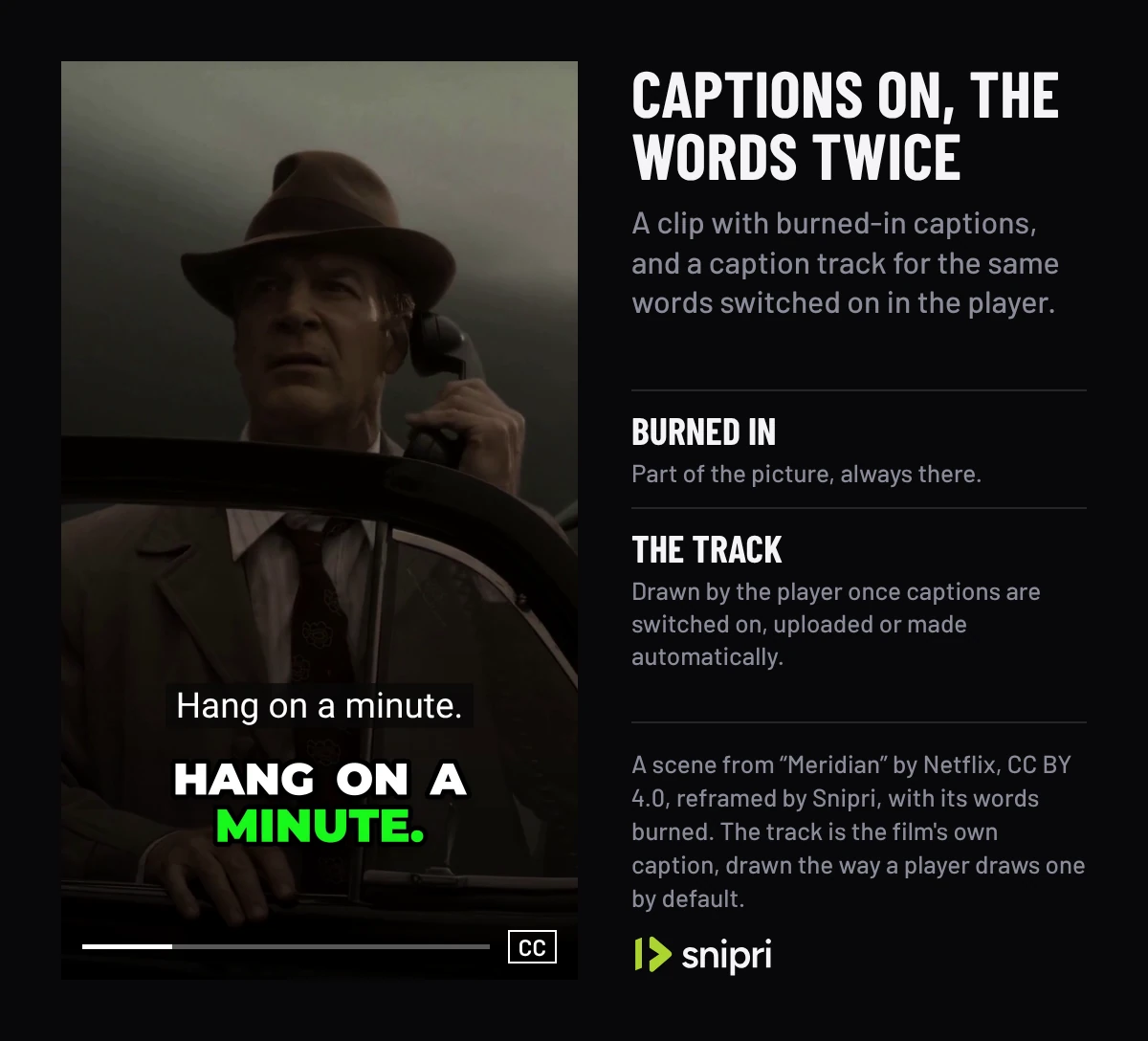
One split avoids the clash: keep the full recording on YouTube with a closed track, and burn captions into the short clips cut from it. Each viewer then gets one set of words.
How Snipri handles captions
Snipri burns open captions into every clip it cuts, animated word by word, in the style you pick: font, size, colour, position and the highlight on the spoken word. Snipri transcribes and captions 25 languages: Croatian, Czech, Danish, Dutch, English, Finnish, French, German, Greek, Hungarian, Indonesian, Italian, Japanese, Korean, Norwegian, Polish, Portuguese, Romanian, Russian, Slovak, Spanish, Swedish, Turkish, Ukrainian and Vietnamese. Choose the spoken language when you add a video, or let Snipri detect it. You can correct any word in the editor before you download, or leave captions off. Snipri does not export a separate caption file, so for a closed track on a long video, use your video platform's own captions or a captioning tool.
The podcast clip maker shows those captions on real clips, and every caption guide is in captions and subtitles for short videos.
Common questions
Are burned-in captions the same as open captions?
Yes. Burned-in, hardcoded and open captions all mean words rendered into the video's frames, which are always displayed and cannot be turned off.
What does CC mean on a video?
CC stands for closed captions: a caption track the viewer can show or hide, usually with a CC button in the player.
What is the difference between captions and subtitles?
W3C uses captions for text in the same language as the speech, including the sounds needed to follow it, and subtitles for speech translated into another language.
Can YouTube add closed captions automatically?
Yes. YouTube uses speech recognition to create automatic captions, in the video's default language only. Check them before you rely on them, or upload your own caption file.
Which is better for accessibility, open or closed captions?
Both make speech readable. Closed captions let viewers hide them and, in some players, set how they look; open captions reach viewers in apps that take no caption file. W3C counts captions as needed for accessibility either way.
Sources
- W3C Web Accessibility Initiative: Captions/Subtitles, checked October 26, 2026.
- YouTube Help: Add subtitles and captions, checked October 26, 2026.
Cihan DüzgörenBuilds and runs Snipri, and wrote this guide